
Why 1-Layer Editing Fails: Inside PSVN’s 2 Layer Quality Control Real Estate Photo Editing
Implementing 2 layer quality control real estate photo editing is the single most effective way to stop morning revision emergencies before your realtor clients ever open their gallery link. In a standard 1-layer outsourcing shop, the editor who blends your brackets uploads the files straight to your delivery folder—meaning any missed ceiling colour cast, window halo, or crooked door frame becomes your problem at 7:30 AM. At PSVN, our 4-step overnight workflow and 2-Layer QC process routes every finished listing through an independent Senior QC Inspector who audits every frame against your Studio Style Profile before delivery.
By Khanh Tran & PSVN Post-Production QC Team · Updated October 23, 2026
2 Layer Quality Control Real Estate Photo Editing: How Our Production Floor Works
When our three production offices in Vietnam process 4,000+ property photos and videos every night, speed is meaningless without visual consistency. To guarantee our 12-hour overnight turnaround SLA at $0.75–$0.85 USD (A$1.15–A$1.30 AUD · £0.65–£0.70 GBP) per photo without sacrificing quality, PSVN separates production into two distinct departments:
- Layer 1 — Dedicated Studio Editing Pod: Instead of routing your upload to a random pool of freelancers, your account is assigned to a permanent pod of full-time editors trained specifically on your camera sensors (Canon, Sony, Nikon, Fujifilm) and preferred HDR or hand-blended Flambient style. Layer 1 performs RAW conversion, manual exposure blending, Darken/Luminosity window pulls, vertical straightening, and sky/lawn replacement.
- Layer 2 — Independent Senior QC Inspector: Once Layer 1 marks a job complete, the entire gallery is locked and assigned to a Senior QC Specialist with 5+ years of architectural retouching experience. The QC Inspector compares the edited sequence side-by-side in Adobe Bridge and Photoshop against your documented Studio Style Profile—rejecting and fixing any frame that falls short before the folder ever reaches your Dropbox or Google Drive.
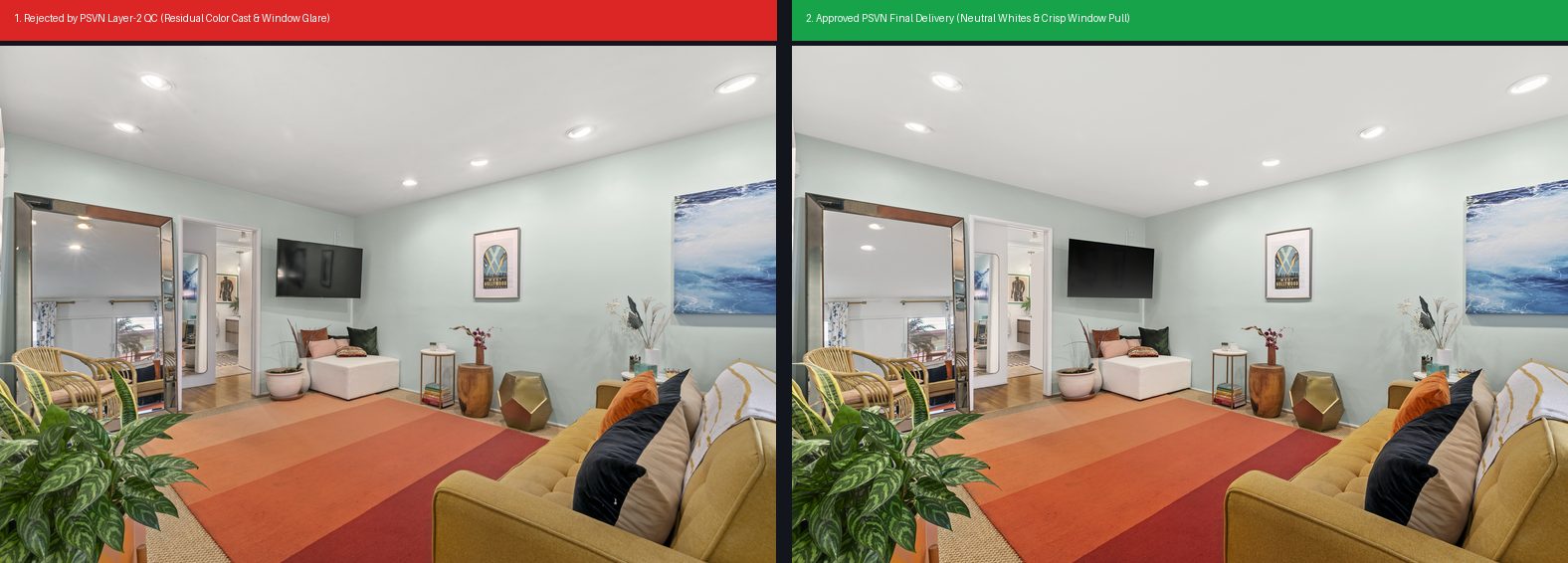
Real Production Case Study: What PSVN’s Layer-2 QC Rejects (And Fixes Overnight)
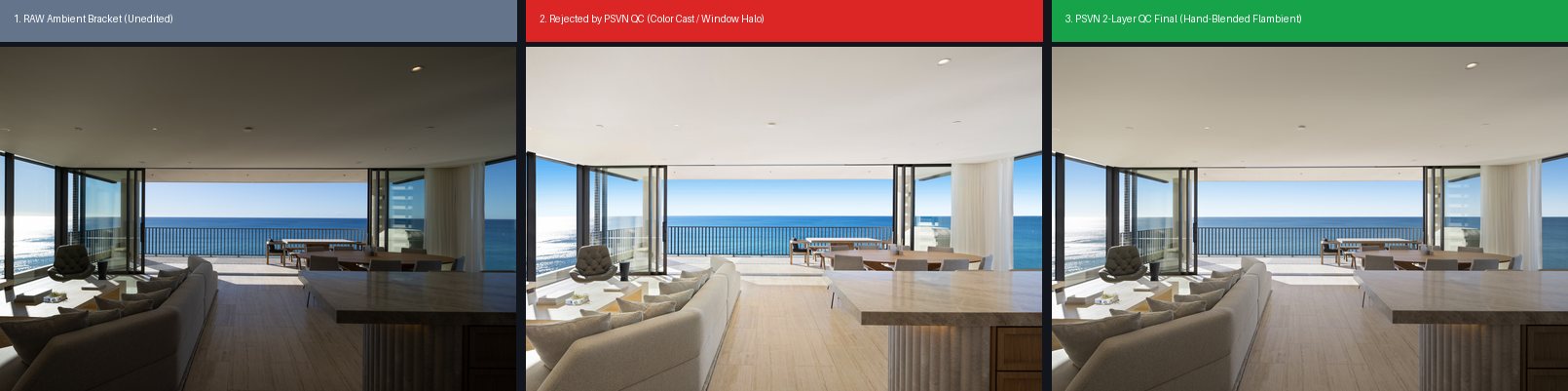
Most editing companies only show their best portfolio shots. Above and below, we have opened our internal production archives to show actual Layer-1 Rejects vs. Layer-2 Approved Finals from architectural shoots processed by our real estate photo editing team.
| Defect Category | Why 1-Layer Editors Miss It | How PSVN Layer-2 QC Fixes It Before Delivery |
|---|---|---|
| 1. Residual Warm / Magenta Ceiling Casts | Fatigued eyes adapt to yellow tungsten warmth after staring at a single room for 10 minutes. | Senior QC checks ceiling RGB values (R=G=B ±3) and desaturates chandelier spill while keeping warm lamp glow intact. |
| 2. Grey Window Halos & Muddy Mullions | Automated luminosity masks leave dark grey edges around white window blinds and frames. | QC replaces automated masks with crisp pen-tool or Darken-mode flash window cuts at 70%–85% natural opacity. |
| 3. Room-to-Room White Balance Drift | When 40 photos are split between two editors, kitchen cabinets in Shot #12 look cooler than Shot #15. | Layer-2 QC opens the entire 40-photo gallery in a grid view (Survey Mode) to match Kelvin and tint across every angle. |
| 4. Specular Floor Glare & Flash Hotspots | Bright coastal windows or direct flash pops wash out hardwood grain in the foreground. | QC blends the ambient shadow frame at 50% opacity to restore natural wood texture and colour depth. |
5. Micro-Vertical & Horizon Tilt (0.3°–0.8°) | Auto-Guided Upright in Lightroom often aligns to a slightly crooked fridge or curtain rod. | QC verifies true architectural verticals against door frames, kitchen island corners, and Cabinetry lines. |
| 6. Unnatural Sky & Grass Saturation | Over-saturated cyan skies or neon green lawns make MLS listings look fake. | QC dials sky luminosity to match the sun direction and uses natural olive-green grass textures. |
The 12-Point PSVN Senior QC Inspection Checklist
Before any job status changes from In QC to Delivered, our Senior QC Inspector verifies these 12 mandatory checkpoints—preventing the hidden reasons real estate photographers lose clients:
- File Count & Naming Match: Every uploaded RAW set has a corresponding finished JPG/TIFF named and numbered in the client’s exact sequence.
- Resolution & Colour Profile: Exported in
sRGB IEC61966-2.1at full print/web resolution (plus MLS-sized web copies if requested in your Style Profile). - True Verticals & Horizontals: All walls, door frames, and kitchen islands are 100% plumb (
90.0°) with zero pincushion or barrel distortion. - Neutral Ceilings & Trim: White ceilings and baseboards are free of yellow incandescent, blue daylight, or green foliage colour casts.
- Natural Window Pulls: Exterior views are clear and properly exposed without dark halos, grey glass, or blown-out white frames.
- Floor & Countertop Glare Control: Hardwood, tile, and stone countertops show true material texture without harsh window sheen.
- Mirror, Glass & Tripod Cleanup: Photographer reflections, flash stands, camera straps, and doorstops are cleanly removed.
- TV, Fireplace & Appliance Finishing: Black TV screens are clean (or filled with your custom screen preset), fireplaces have realistic flames, and stainless steel appliances are smudge-free.
- Exterior Sky, Lawn & Driveway Polish: Overcast skies are replaced with natural clouds matching shadow direction; oil stains, trash bins, and garden hoses are removed when digital decluttering is requested.
- Gallery-Wide Exposure & Colour Cohesion: Consecutive angles of the same room share identical brightness, contrast, and colour temperature.
- Add-On Verification: Any accompanying Day-to-Dusk twilight conversions or 3D virtual staging rooms match the exact architectural geometry of the daytime photos.
- On-Time SLA Verification: Delivered ahead of your 12-hour overnight deadline so files are waiting in your inbox by 7:00 AM–8:00 AM local time.
How Custom Studio Style Profiles Keep Multi-Shooter Agencies Consistent
As we explained in our guide on the workflow behind every consistently delivered image, scaling a photography business from one shooter to five shooters often breaks visual consistency. Shooter A might shoot 5-bracket HDR on Sony .ARW bodies, while Shooter B shoots 3-bracket Flambient on Canon .CR3 bodies.
When you onboard with PSVN, our QC team builds a permanent Studio Style Profile for your brand. Even when different photographers on your team upload different bracket styles on the same night, our Layer-1 pod and Layer-2 QC Inspector normalize white balance, shadow contrast, and window brightness so your real estate agent clients receive a single, recognizable signature look.
Frequently Asked Questions: PSVN’s 2-Layer QC Process
Does 2-Layer Quality Control cost extra or slow down turnaround?
No. Our 2-Layer QC inspection is included free of charge on every order—whether you pay $0.60 USD (A$0.90 AUD · £0.50 GBP) for single exposures or $0.75–$0.85 USD (A$1.15–A$1.30 AUD · £0.65–£0.70 GBP) for HDR and Flambient blending—within our standard 12-hour overnight turnaround.
What happens if I want to tweak my Studio Style Profile?
Simply message your dedicated project manager or leave a note on any order. Our Senior QC Inspector updates your Style Profile immediately and applies the adjustment across all future jobs, backed by 100% free unlimited revisions.
How can I test PSVN’s 2-Layer QC on my own RAW brackets?
You can start your 100% Free Trial with PSVN right now—no credit card required. Upload 3 RAW bracketed photo sets + 1 video clip (or up to 5 RAW bracketed sets), and experience our 2-Layer QC delivery within 12–24 hours plus a 10% discount on your first month’s invoice.
Related Articles



Comment